
Wireless
Exit And Reopen The Phone App On iPhone
1 min read
- Open the Phone app on your iPhone.
- Swipe up from the bottom of your display to access the app scroller.
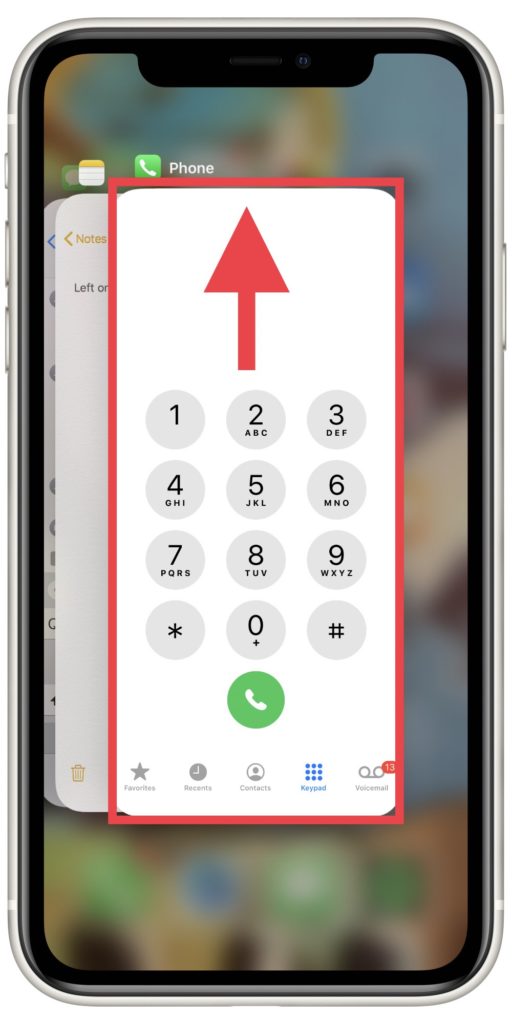
- Once you reach the app scroller, touch the Phone app and swipe up toward the top of your display until it disappears from screen.
- Tap the bottom of your screen to return to your home page.
- Tap the Phone icon to reopen the app.
Why this works:
Sometimes, apps can encounter minor software glitches that prevent them from working properly. This issue could occur on any app, including the Phone app.
Briefly closing out of the Phone app can give the app’s software a chance to restart. It’s possible that completing this step will resolve the error you’re experiencing completely, and everything will start working fine as soon as you open the Phone app back up.


Beyond fixing
If repairs aren’t worth it, here’s how to pick what’s next.
Compare 328 phones across every carrier.